DLSS, FSR and XeSS: Why Game Requirements Now Assume You're Upscaling
Upscaling moved from an optional setting to a load-bearing assumption without most people noticing. It is now written into published system requirements — sometimes explicitly, sometimes as a footnote — and the three vendor implementations have meaningfully different hardware rules. Here is what each vendor documents, and what that means when you are reading a store page.
What upscaling actually does
The game renders at a lower internal resolution than the one on your monitor, then a reconstruction step produces the output image. Fewer pixels rendered means more frames per second. How good the result looks depends entirely on the quality of that reconstruction step, which is where the three vendors differ.
This is separate from frame generation, which is a different technology that gets bundled under the same brand names. More on that below, because conflating them causes most of the confusion in this area.
The evidence that requirements now assume it
You do not have to take anyone's word for this. It is in the requirement boxes:
- Black Myth: Wukong, in both its minimum and recommended blocks: "The above specifications were tested with DLSS/FSR/XeSS enabled."
- Resident Evil Requiem, minimum: "Supports 1080p gameplay (using upscaling, native resolution of 640p)/30fps." Recommended: the same, from a native 720p, at 60fps.
- Phantom Blade Zero, minimum: "1080p / 30 FPS with upscaling enabled." Recommended: "1440p / 60 FPS with upscaling enabled."
The hardware named in those boxes is not the hardware required to run the game at native output resolution. It is the hardware required to run it with reconstruction doing part of the work.
NVIDIA DLSS
NVIDIA describes DLSS as "a revolutionary suite of neural rendering technologies that uses AI to boost FPS, reduce latency, and improve image quality." It is a suite, not one feature, and the suite is where the GPU-generation rules live. Per NVIDIA's own support table:
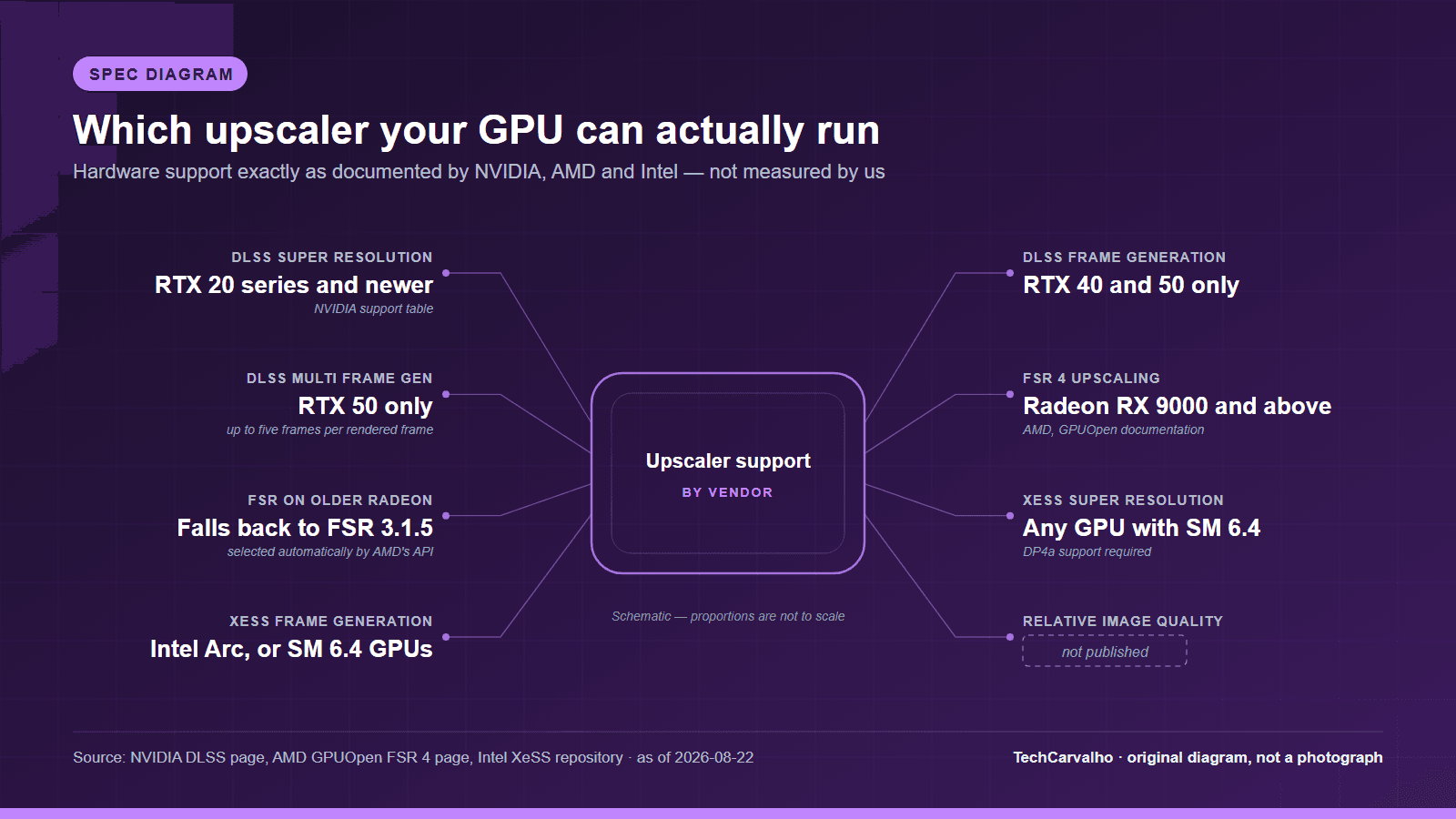
- Super Resolution — the upscaler itself. RTX 20, 30, 40 and 50 series.
- DLAA — anti-aliasing at native resolution, no upscaling. RTX 20, 30, 40 and 50 series.
- Ray Reconstruction — improves ray-traced scenes. RTX 20, 30, 40 and 50 series.
- Frame Generation — RTX 40 and 50 series only.
- Multi Frame Generation — RTX 50 series only. NVIDIA describes it as generating up to five frames per rendered frame.
- Dynamic Multi Frame Generation — RTX 50 series only.
The practical takeaway: if a game's requirement box assumes DLSS, an RTX 20-series card can satisfy the upscaling part of that assumption. The frame-generation features are a much narrower hardware window.
AMD FSR 4
AMD describes FSR 4 as "a cutting-edge ML upscaler combined with analytical frame generation to deliver a massive increase in framerates in supported games."
The hardware rule is stricter than the older FSR versions people remember, and it comes with a fallback that is easy to miss. AMD's own wording: "AMD FidelityFX Super Resolution 4 upscaling requires an AMD Radeon RX 9000 Series GPU or better and can only be used on appropriate hardware. When running on other hardware the AMD FidelityFX API will automatically select AMD FidelityFX Super Resolution 3.1.5."
That fallback matters. Turning "FSR" on in a game on an older Radeon card does not give you FSR 4 — it silently gives you FSR 3.1.5, which is a different, non-machine-learning algorithm. If you have read that FSR 4 substantially closed the image-quality gap with DLSS, that improvement is tied to RX 9000-series hardware and AMD's RDNA 4 architecture, not to the FSR brand name in a settings menu.
Intel XeSS
XeSS is the vendor-agnostic one, and Intel documents it that way. Intel describes XeSS as "a set of real-time AI-based technologies that drastically boost your frame rate at the highest visual quality while keeping your game responsive," currently shipping as the XeSS 3 SDK. Its components:
- XeSS Super Resolution — "boosts frame rates on all GPUs with SM 6.4 (DP4a) support."
- XeSS Frame Generation — "available on discrete and integrated Intel Arc GPUs, as well as non-Intel GPUs with SM 6.4 support."
- Xe Low Latency (XeLL) — "available on discrete and integrated Intel Arc GPUs, as well as non-Intel GPUs when combined with XeSS-FG."
Shader Model 6.4 with DP4a support is a broad target that includes plenty of non-Intel hardware. In practice XeSS is the option most likely to be available to you on an older or mixed-vendor system, which is exactly why Black Myth: Wukong lists all three brands together rather than one.
Upscaling and frame generation are not the same thing
Upscaling reduces the work needed to produce each rendered frame. Frame generation produces additional frames between rendered ones. Both raise the number on your frame counter; they do not do the same thing to how the game feels.
One structural signal worth noting — and this is our reading of the vendors' own documentation rather than something either company states as a caveat: both NVIDIA and Intel pair frame generation with a dedicated latency-reduction technology, and Intel goes as far as making XeLL a requirement of XeSS-FG integration. A generated frame does not carry new input sampling, so a latency-reduction layer exists alongside frame generation for a reason. If you are chasing responsiveness rather than smoothness, that is the distinction to hold onto.
How to read this when buying
- If a game states a requirement "with upscaling enabled", check that your card supports the specific upscaler that game implements, not just "an upscaler".
- On Radeon, check the FSR version, not the FSR logo. FSR 4 upscaling means RX 9000 series or newer, per AMD.
- On GeForce, upscaling support goes back to RTX 20; frame generation does not.
- If your GPU is from neither vendor's recent generations, XeSS Super Resolution is the widest-compatibility option, by Intel's own description.
When this doesn't matter
If you already hit your monitor's refresh rate at native resolution in the games you play, upscaling is solving a problem you do not have, and enabling it costs image quality for frames you cannot display.
If you play primarily competitive multiplayer titles, most players in that category are better served by lowering settings than by reconstruction — and frame generation in particular is a poor fit for the thing those players actually care about.
If you play at 1080p, upscaling has the least raw material to work with. Reconstruction quality improves as the internal resolution rises, which is why the 4K case is the one vendors demonstrate.
And if your GPU predates the relevant feature entirely, no settings menu will change that. The fallback behaviour AMD documents is the clearest example: the option still appears, but you are not getting the technology you read about.
What we have not done here
TechCarvalho has not run image-quality comparisons or measured frame rates for any of these technologies. Every hardware-support statement above is quoted from NVIDIA's, AMD's or Intel's own documentation as published on 22 August 2026, and every requirement quote is from the game's own store listing. Vendor support matrices change with driver and SDK releases; check the vendor page before making a purchase decision on the strength of one.
Products covered
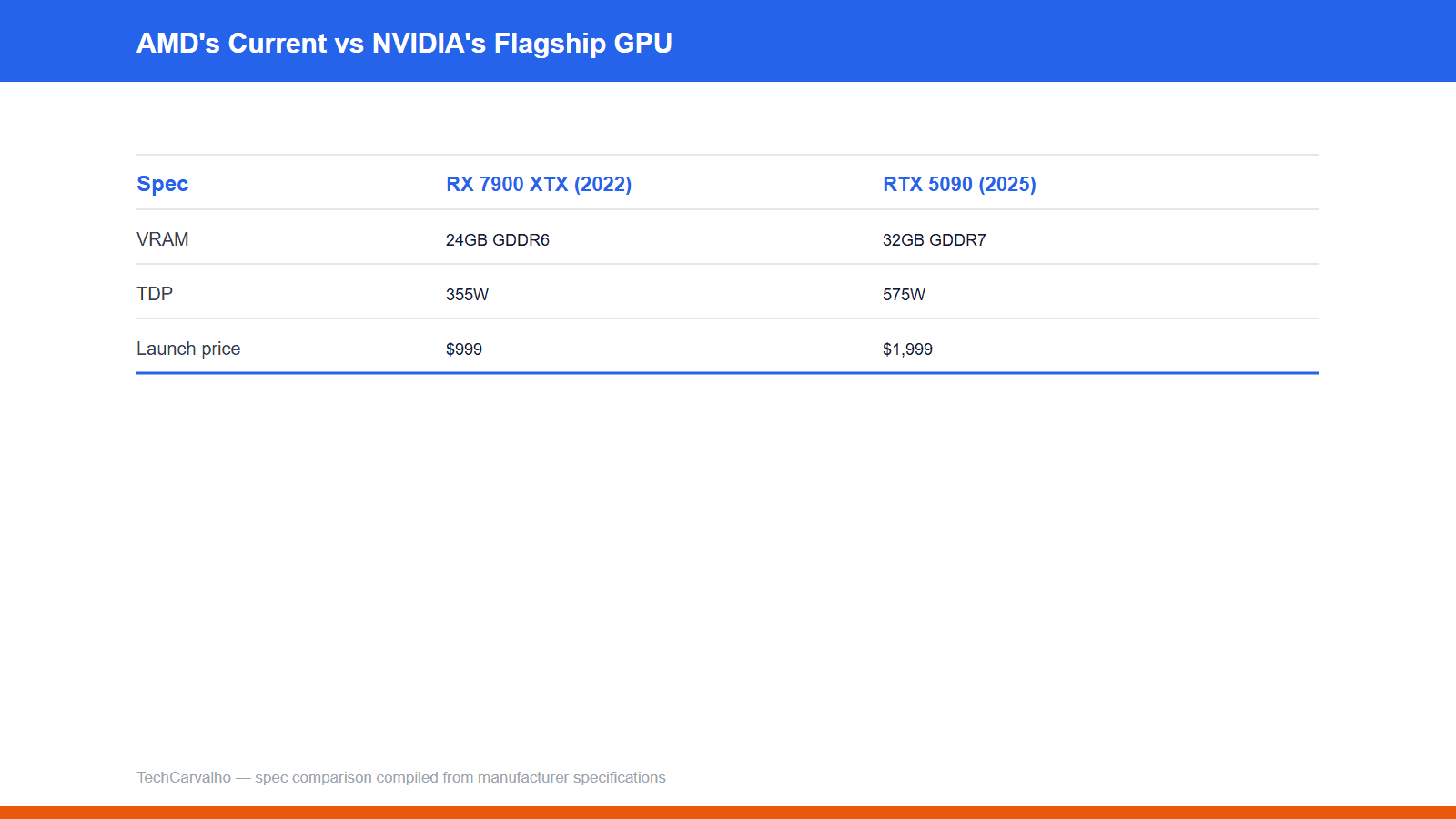
| Specification | AMD Radeon RX 7900 XTX | NVIDIA GeForce RTX 5090 |
|---|---|---|
| Boost clock | up to 2.5 GHz | 2.41 GHz |
| TDP | 355W | 575W |
| VRAM | 24GB GDDR6 | 32GB GDDR7, 512-bit bus |
| CUDA/Stream cores | 6,144 stream processors | 21,760 CUDA cores |
| Launch price (USD) | 999 USD | 1999 USD |
Sources
- S-GAME / Steam store listingprimary source
- Game Science / Steam store listingprimary source
- Capcom / Steam store listingprimary source
- Intelprimary source
- AMD (GPUOpen)primary source
- NVIDIAprimary source
Tech Carvalho does not publish hands-on test results. This piece is written from the sources above and from public documentation. See our editorial policy.