Wi-Fi 4 to Wi-Fi 7: What Each Generation Actually Changed
What each Wi-Fi generation genuinely added, why the certification date and the IEEE date are years apart, and when a newer number on the box changes nothing you can feel.
Router boxes sell a number. Wi-Fi 6, Wi-Fi 6E, Wi-Fi 7 — each arrives with a bigger figure on the front and an implication that the previous one is now obsolete. Some of those numbers describe changes you will genuinely feel. Most describe changes that are real engineering and completely invisible in an ordinary home. This is which is which.
Two things are worth establishing before the history, because almost every wrong claim about Wi-Fi generations comes from getting them muddled.
Two different dates, and marketing blurs them
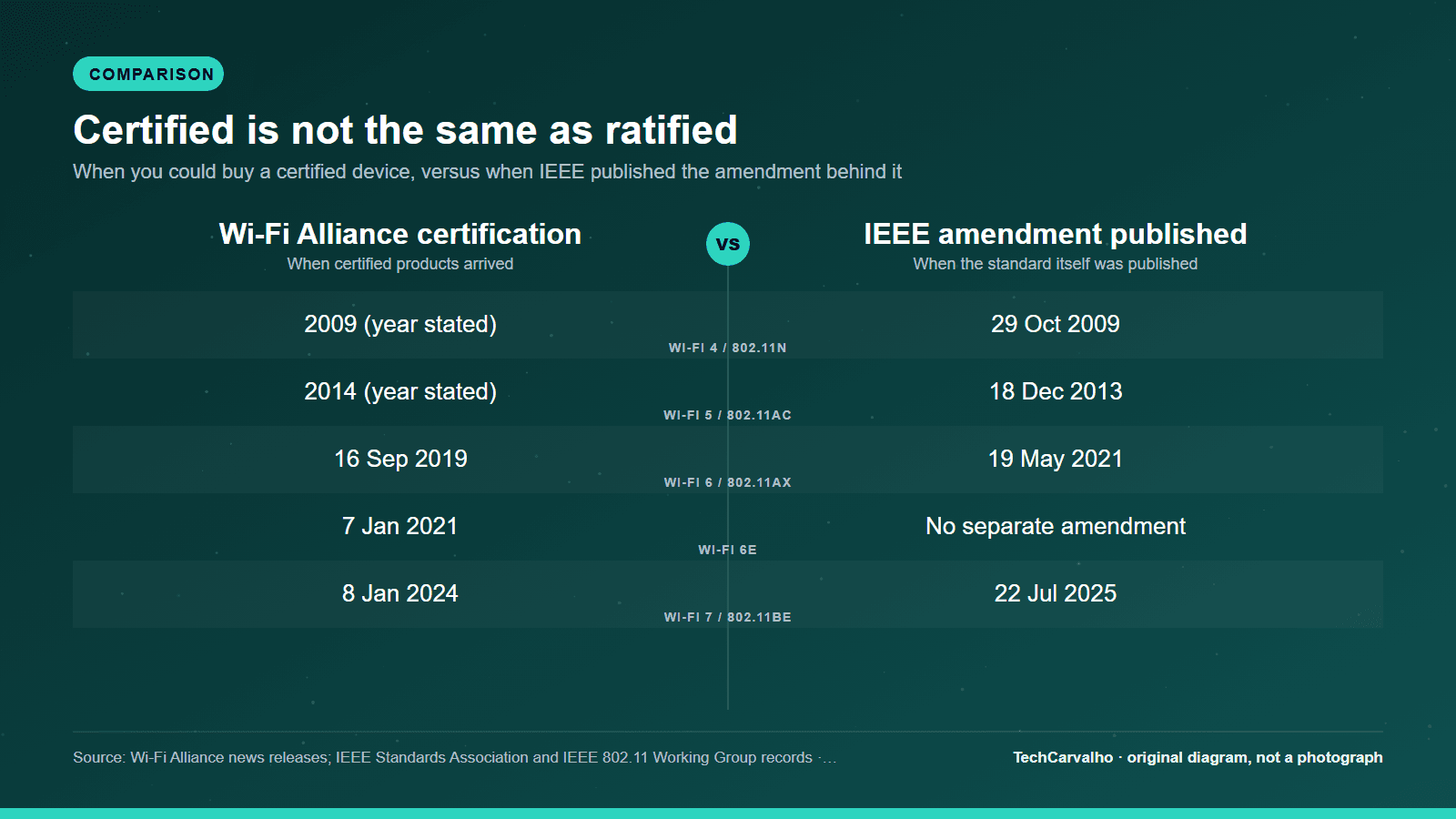
Wi-Fi generations have two birthdays.
One is the IEEE amendment — the actual engineering standard, published by the IEEE Standards Association. The other is the Wi-Fi Alliance certification programme, which is the industry body that owns the "Wi-Fi 6" style names and tests products for interoperability.
For the recent generations these are not close together. IEEE lists 802.11ax as published on 19 May 2021, but Wi-Fi Alliance announced that "the Wi-Fi CERTIFIED 6 certification program from Wi-Fi Alliance is now available" on 16 September 2019 — roughly twenty months earlier. The same pattern repeats with Wi-Fi 7: certification arrived on 8 January 2024, while IEEE lists 802.11be as published on 22 July 2025.
That is not a scandal; certification programmes are deliberately built on stable drafts so the industry does not have to wait years for final publication. But it does mean that "the standard wasn't even finished" is a common and technically true criticism of early hardware for any generation, and that dates you see quoted for the same generation can legitimately differ by two years depending on which event is being described.
The second complication: Wi-Fi Alliance's own product pages give a third set of years — it says Wi-Fi 4 "was introduced in 2009", Wi-Fi 5 in 2014, Wi-Fi 6 in 2018 and Wi-Fi 7 in 2024. For Wi-Fi 6, "2018" is when the generation was named, a year before you could buy anything certified. Where this article gives a precise date, it is from the Alliance's own press releases or IEEE's own records, and it says which.
Wi-Fi 4 (2009): where home Wi-Fi became normal
IEEE published 802.11n on 29 October 2009 as "Amendment 5: Enhancements for Higher Throughput". Its stated design objective was modest by today's standards and worth quoting because it puts the rest of this list in scale: modes of operation "capable of much higher throughputs, with a maximum throughput of at least 100 Mb/s, as measured at the MAC data service access point".
Wi-Fi Alliance's own summary of Wi-Fi 4 is marketing rather than specification — "enhanced performance and speed", "extended reach throughout the home", "support for many users without sacrificing signal strength" — and its current page does not state the bands or channel widths, so this article will not either.
The practical position today: Wi-Fi 4 is the oldest generation still worth tolerating. A smart plug or an old printer sitting on Wi-Fi 4 is not hurting anything. A Wi-Fi 4 router is from a different era of home broadband, and replacing it is one of the few genuinely straightforward upgrade cases in this entire article.
Wi-Fi 5 (2013/2014): the 5 GHz generation, in two waves
IEEE's 802.11 Working Group timelines put 802.11ac's publication at 18 December 2013; Wi-Fi Alliance says Wi-Fi 5 "was introduced in 2014".
The thing to understand about Wi-Fi 5 is that it shipped in two distinct waves, and the second one matters more than most people realise. Wi-Fi Alliance's June 2016 announcement of the expanded programme describes what wave 2 added: channels went "from 80 MHz to 160 MHz maximum bandwidth", spatial streams went from three to four, and multi-user MIMO arrived — described by the Alliance as networks "capable of multitasking by sending data to multiple devices at once rather than one-at-a-time". The Alliance claimed devices with these features could reach "up to three times the speed of devices supporting only original Wi-Fi CERTIFIED ac features".
So MU-MIMO is a Wi-Fi 5 feature, not a Wi-Fi 6 one. Plenty of coverage gets this wrong.
One structural note that explains a lot of confusion: 802.11ac itself is a 5 GHz specification. A "dual-band Wi-Fi 5 router" is a Wi-Fi 5 radio on 5 GHz sitting alongside an older-generation radio on 2.4 GHz. Wi-Fi Alliance's own product page reflects the product reality rather than the amendment, noting that "most Wi-Fi 5 products are dual-band, operating in both the 2.4 GHz and 5 GHz bands".
This is also the generation that made "is my device on 2.4 GHz or 5 GHz?" the single most useful diagnostic question in home networking — a question that comes up again in our Wi-Fi troubleshooting guide and, unavoidably, in almost every smart-home setup problem.
Wi-Fi 6 (certified September 2019): efficiency, not headline speed
This is the generation people most often misread, because its additions are about handling many devices at once rather than making one device faster. From Wi-Fi Alliance's own certification announcement:
- OFDMA "effectively shares channels to increase network efficiency and lower latency"
- Downlink MU-MIMO "allows more downlink data to be transferred at once"
- Target Wake Time "significantly improves battery life in Wi-Fi devices"
- 1024-QAM "increases throughput in Wi-Fi devices"
- and the programme "requires the latest generation of Wi-Fi security, Wi-Fi CERTIFIED WPA3"
Read that as a whole and the design intent is unmistakable. Wi-Fi 6 was built for a home with forty connected things in it, not for making a single laptop download faster. If your household has a handful of devices and no congestion, Wi-Fi 6 is solving a problem you do not have. If your network is dense and busy — a shared flat, a house full of smart-home gear — this is the generation where the difference is real, and it shows up as consistency under load rather than as a bigger number in a speed test.
The WPA3 requirement is the quiet one on that list and arguably the most consequential, since it is a security floor rather than a performance feature. It is also, as it happens, a recurring cause of smart-home devices refusing to join a new router.
Target Wake Time is worth singling out for battery-powered devices: it lets a device negotiate when it needs to be awake to talk to the router instead of listening constantly.
Wi-Fi 6E (named January 2020, certified January 2021): new spectrum, same radio
Wi-Fi 6E is not a new generation. Wi-Fi Alliance is explicit: "Wi-Fi 6E certification as part of Wi-Fi CERTIFIED 6 offers the features and capabilities of Wi-Fi 6, extended to the 6 GHz band."
The name was announced on 3 January 2020 so buyers would have a way to identify 6 GHz-capable devices once regulators opened the band. Certification followed on 7 January 2021, after the US FCC's decision of 23 April 2020 to open the 6 GHz band to unlicensed use — 1,200 megahertz of it.
What that extra spectrum buys, in the Alliance's own words, is room: 6 GHz "addresses Wi-Fi spectrum shortage by providing contiguous spectrum blocks to accommodate 14 additional 80 MHz channels and 7 additional 160 MHz channels".
Contiguous is the operative word. The 2.4 and 5 GHz bands are crowded, fragmented by regulation, and shared with every neighbour in range. 6 GHz arrived clean and wide. That is why a 6 GHz link can feel dramatically better than a 5 GHz one in a block of flats — not because the radio is cleverer, but because nobody else is standing on it yet.
The trade-off is physics and it is not negotiable: higher frequencies attenuate faster through walls and floors. A 6 GHz link is superb in the same room as the router and degrades faster than 5 GHz as you move away. Anyone selling 6 GHz as a coverage improvement has it backwards.
The 6 GHz catch nobody puts on the box
How much 6 GHz you may legally use depends entirely on where you live, and the world is split into two tiers.
According to Wi-Fi Alliance's regulatory tracker, one group of countries has opened the full 5925 to 7125 MHz range — the whole 1,200 MHz — including the United States, Canada, Brazil, Mexico, Argentina, Colombia, Peru, Costa Rica, Panama, Guatemala, El Salvador, the Dominican Republic, Kazakhstan, Saudi Arabia and South Korea. A much larger group, including the EU member states, Japan, Australia, India, Israel, New Zealand, Singapore, South Africa and the UAE, has opened only the lower portion, 5925 to 6425 MHz — around 500 MHz, well under half. Australia has additionally allowed 6425 to 6585 MHz.
The practical consequence: a Wi-Fi 7 router advertising 320 MHz channels needs enough contiguous 6 GHz spectrum to fit them. In a lower-6 GHz-only country, that capability is substantially constrained by regulation regardless of what the hardware can do. A review written for the US market does not transfer to a European one on this point.
The UK is currently a genuinely confusing case, and we would rather flag that than smooth it over. Wi-Fi Alliance published a press release describing an Ofcom decision of 20 July 2026 making the UK "the first European country to enable Wi-Fi access across the entire 6 GHz band" — licence-exempt access across the full 1,200 MHz. We have not been able to read Ofcom's own statement to confirm the detail directly, so treat that as reported rather than verified here. Adding to the confusion, Wi-Fi Alliance's own regulatory map still lists the UK in the narrower 5925 to 6425 MHz tier, contradicting its own announcement. If you are in the UK and this matters to your purchase, check Ofcom directly rather than trusting any secondary summary, this one included.
Wi-Fi 7 (certified January 2024): wider channels, and using two bands at once
Wi-Fi Alliance introduced Wi-Fi CERTIFIED 7 on 8 January 2024. IEEE lists 802.11be as published on 22 July 2025, which as noted is the usual pattern rather than an anomaly.
The headline capabilities, in the Alliance's own descriptions:
- 320 MHz channels "available in the 6 GHz band provide twice the throughput of Wi-Fi 6". Twice the width of the widest Wi-Fi 6 channel, and only possible in 6 GHz, because that is the only band with room for it.
- Multi-link operation, "which increases throughput and lowers latency by enabling devices to combine different channels across frequency bands together". The Alliance also frames MLO as supporting "more efficient load balancing of traffic among links, resulting in increased throughput and enhanced reliability".
- 4K QAM, delivering "20% higher transmission rates than 1024 QAM".
- Plus multi-RU, 512 compressed block-ack, triggered uplink access and EPCS.
Of those, multi-link operation is the genuinely new idea. Until Wi-Fi 7, a device was attached to one band at a time and switched between them, with a brief interruption at each switch. MLO lets a device use more than one link simultaneously. The Alliance's own framing puts "enhanced reliability" alongside throughput, and reliability is the half that matters for real use — a connection that survives one band briefly going bad is a better connection even when its peak number is unchanged.
Wi-Fi 7 is also still evolving. On 6 January 2026 Wi-Fi Alliance extended the programme to 20 MHz-only devices, bringing MLO, MU-MIMO and multi-RU to the narrow-channel radios used in Internet-of-Things hardware — a meaningful development for smart-home reliability that has nothing to do with speed.
About those headline speed numbers
You have seen the figures: 600 Mbps for Wi-Fi 4, several gigabits for Wi-Fi 5, 9.6 Gbps for Wi-Fi 6, tens of gigabits for Wi-Fi 7. We are not printing them, because we could not source a single one of them to Wi-Fi Alliance or to IEEE. They circulate widely, they are broadly in the right region, and they are also theoretical aggregate maxima that assume channel widths, spatial streams and modulation rates no home device combines in practice.
What can be sourced are the IEEE throughput objectives, which are honest about being objectives: 802.11n targeted "at least 100 Mb/s" measured at the MAC service access point, and 802.11be requires "at least one mode of operation capable of supporting a maximum throughput of at least 30 Gbit/s". The gap between those two figures across sixteen years is the real story; the precise decimal on a box is not.
The number that actually limits you
Your Wi-Fi standard sets a ceiling on the link between your device and your router. It has no effect whatsoever on the speed of the line coming into your building. If your broadband is 100 Mbps, a Wi-Fi 7 router cannot deliver more than that to the internet — it can only ensure the local link is never the bottleneck, and Wi-Fi 5 already was not the bottleneck at that speed.
The second ceiling people forget is the client. A Wi-Fi 7 router talking to a Wi-Fi 5 laptop produces a Wi-Fi 5 connection. Every link negotiates down to what both ends support, so a new router upgrades nothing until the devices you actually care about are also on the new generation.
When this genuinely does not matter to you
- Your internet connection is the bottleneck. If your line is a few hundred megabits and your devices already reach it in the rooms you use, every generation from Wi-Fi 5 onwards is fast enough and no new standard will move your speed test.
- Your problem is coverage, not throughput. Dead zones are about walls, distance and access-point placement. A newer standard on a higher frequency makes coverage marginally worse, not better. Start with the free checks in our Wi-Fi troubleshooting guide, and treat mesh as a separate question.
- Your devices are older than your router. Buying Wi-Fi 7 for a house of Wi-Fi 5 devices buys a future capability and nothing today.
- You are in a lower-6 GHz-only country and the sales pitch is 320 MHz channels. Check what your regulator has actually opened before paying for a capability the law limits.
- The workload you care about could be wired. For a desktop that never moves, a cable sidesteps this entire article, as our Ethernet versus Wi-Fi piece sets out.
When a newer generation genuinely is worth buying
- Your network is congested rather than slow: many devices, evening slowdowns, video calls that fall apart when the household is busy. This is exactly what Wi-Fi 6's efficiency features address.
- You live with heavy neighbouring-network interference and 6 GHz is legally available to you. Clean spectrum is the most immediate real-world upgrade on this list.
- You have a multi-gigabit internet connection and want a wireless client to actually use it. Here the Wi-Fi generation genuinely is the limiting factor.
- Your router is old enough to predate WPA3, and you would like a security floor rather than a speed increase.
- You are replacing a failing or genuinely ancient router anyway. Buying current when you are buying regardless is sensible; that is a different decision from replacing a working router because a bigger number exists.
The short version
Wi-Fi 4 made home wireless usable. Wi-Fi 5 made 5 GHz standard and, in its second wave, introduced MU-MIMO. Wi-Fi 6 made crowded networks behave and made WPA3 a requirement. Wi-Fi 6E opened new spectrum without changing the radio. Wi-Fi 7 widened the channels and let a device use more than one link at once.
Every one of those is a real advance. For most households, on most broadband connections, the last one that changed anything they could feel was the arrival of a working 5 GHz band.
Illustration — AI-generated editorial artwork, not a photograph.
Sources
- Wi-Fi Allianceprimary source
- US Federal Communications Commissionprimary source
- Wi-Fi Allianceprimary source
- IEEE Xploreprimary source
- IEEE 802.11 Working Groupprimary source
- IEEE Standards Associationprimary source
- IEEE Standards Associationprimary source
- Wi-Fi Allianceprimary source
- Wi-Fi Allianceprimary source
- Wi-Fi Allianceprimary source
- Wi-Fi Allianceprimary source
- Wi-Fi Allianceprimary source
- Wi-Fi Allianceprimary source
- Wi-Fi Allianceprimary source
- Wi-Fi Allianceprimary source
- Wi-Fi Allianceprimary source
- Wi-Fi Allianceprimary source
Tech Carvalho does not publish hands-on test results. This piece is written from the sources above and from public documentation. See our editorial policy.