Do You Need a Powerful PC for Photo and Video Editing?
The honest answer is "it depends heavily on what you're editing" — RAW photos and 4K/8K video stress completely different parts of a PC.
The honest answer is "it depends heavily on what you're editing" — RAW photos and 4K/8K video stress completely different parts of a PC.
Photo editing (Lightroom Classic)
Per Puget Systems, a workstation builder that benchmarks specifically against Adobe workloads, **CPU matters more than GPU** for Lightroom, because RAW processing, culling, and exporting remain primarily CPU-bound — and there's a real ceiling on how many cores Lightroom uses effectively, so an expensive 32-core CPU isn't necessarily better than a well-chosen 8-16 core one. Their recommendation: minimum 32GB RAM, 64GB safer. GPU matters less overall, but Lightroom's AI noise reduction and masking do lean on it — a mid-tier card with meaningful VRAM helps if you use those features heavily.
Video editing (Premiere Pro / DaVinci Resolve)
This scales hard with resolution, and the two apps behave differently. **Premiere Pro** leans on the CPU for timeline work, using the GPU for accelerated effects and hardware H.264/HEVC encoding. **DaVinci Resolve** is GPU-heavy almost everywhere — color grading and most OFX operations run primarily on the GPU, so Resolve users benefit far more from a high-VRAM card.
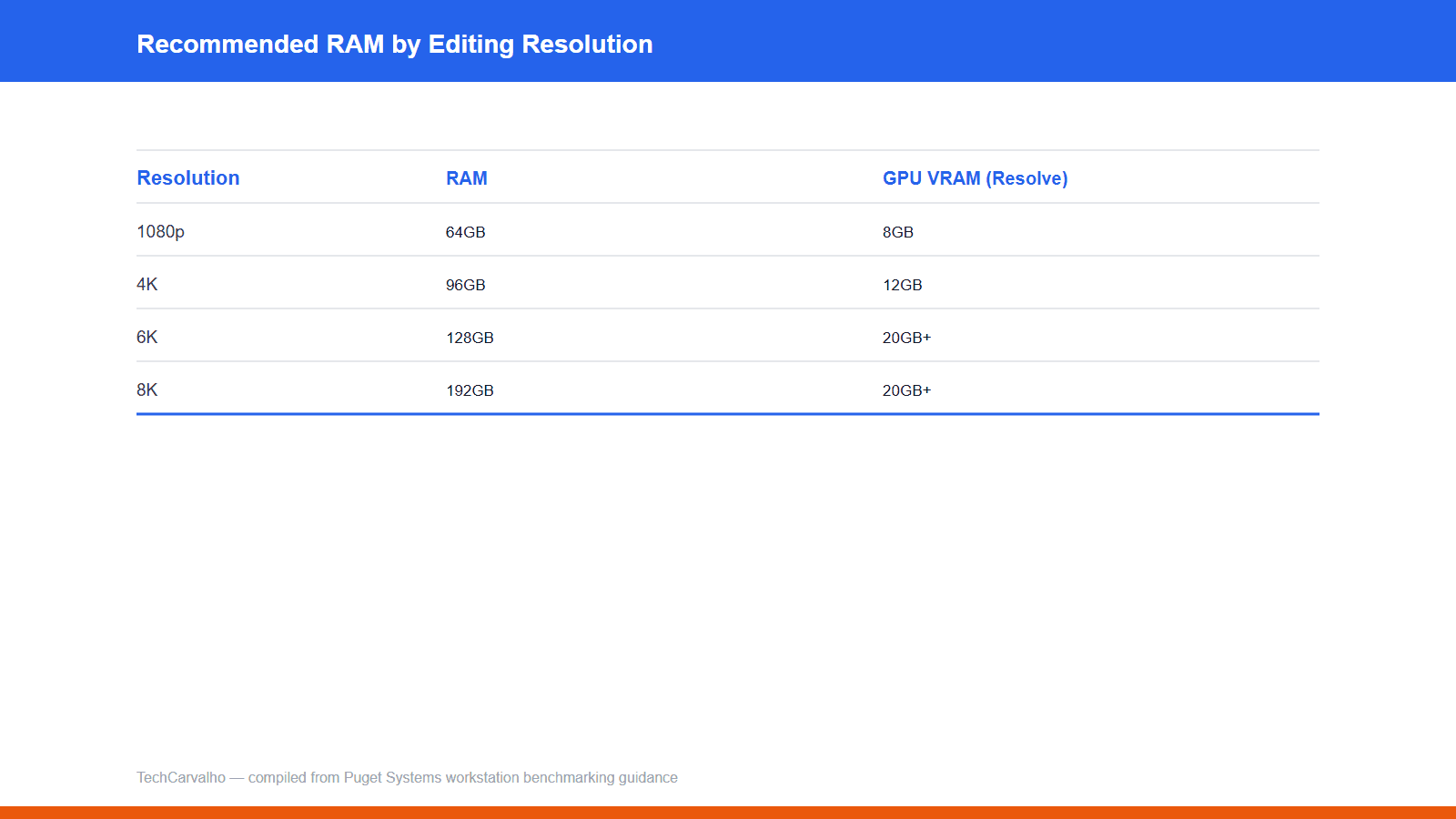
Puget's RAM guidance scales directly with footage resolution: 1080p needs ~64GB (8GB VRAM), 4K ~96GB (12GB VRAM), 6K ~128GB (20GB+ VRAM), 8K ~192GB (20GB+ VRAM). Someone cutting 4K drone footage is in a very different bracket than someone grading 8K RAW.
Storage matters more than people expect
A three-drive setup is recommended for serious editing: fast NVMe for OS and apps, a second drive for project files, and a dedicated NVMe scratch/cache disk. Only footage above roughly 2,000 Mbps actually needs NVMe-level speed. Editing directly off an external USB drive is a common source of stuttering people mistake for a CPU/GPU problem.
Practical guidance
**RAW photo editor:** solid modern CPU + 32-64GB RAM; mid-range GPU with 12-16GB VRAM is plenty. **4K drone/action-cam editor:** 64-96GB RAM, 12GB+ VRAM, NVMe scratch disk. **8K RAW / serious colorist:** genuinely workstation territory.
Don't buy for the workload you might someday have — RAM and VRAM needs roughly double per resolution tier rather than scaling gradually.
Products covered
| Specification | AMD Ryzen 9 9950X | NVIDIA GeForce RTX 5090 |
|---|---|---|
| Boost clock | up to 5.7 GHz | 2.41 GHz |
| TDP | 170W (230W max package power) | 575W |
| Launch price (USD) | 649 USD | 1999 USD |
Sources
Tech Carvalho does not publish hands-on test results. This piece is written from the sources above and from public documentation. See our editorial policy.